
Technology & AI
10 Tips to Improve Network Speed and Reliability


For work, school, entertainment, and staying connected, a fast and dependable internet connection is now essential. However, many people don’t know why they experience buffering, connection drops, or slow speeds. Fortunately, rather than costly upgrades, enhancing your network typically requires only a few practical modifications. From optimizing your router’s placement to managing connected devices and maintaining your equipment, this guide explores straightforward and efficient methods for increasing network speed and reliability. You can have a stronger, more stable connection and keep your home or office network running at its best by following these helpful hints.
Essential Strategies for Faster Internet Right Away
Most of the time, a faster connection starts with things you can actually see, like where your router is, whether it’s up to date, and how old your equipment is. Take a quick look around your space before you call your service provider and put yourself on hold. Slowdowns can sneak up on small offices, clinics, homes, and schools. Network performance monitoring tools can help show when trouble started, where it happened, and what might be causing it if you’re tired of guessing.
-
Position Your Router for Maximum Signal Strength
Space is needed for your router to breathe. Place it as close to the center of your space as you can, but don’t stuff it behind the TV, put it in a cabinet, or leave it on the floor next to a mess of cords. Height also helps. The signal can be spread out more evenly with a tall piece of furniture, wall mount, or shelf. Even though it’s a small change, it can sometimes make a big difference.
-
Update Router Firmware for Better Stability
The software that runs on your router is called router firmware. Even though it’s not exciting, it matters. Your router can handle multiple phones, laptops, televisions, and smart devices without acting dramatically thanks to updates, which can also address security flaws and bugs. Numerous recent routers automatically update. If yours does not, check periodically on the admin page. Firmware is the next easy win after your router is in a better location. Drops, lag, and odd performance issues can sometimes be fixed with a single update.
-
Replace Outdated Networking Hardware
Old routers can sneak up on you. They turn on, flash as if everything is fine, but they still can’t keep up with your life. Your router may struggle with streaming, gaming, video calls, smart home devices, and simultaneous scrolling if it is more than a few years old. This does not imply that your internet plan is inadequate. It could indicate that your hardware is the problem. Newer routers, especially WiFi 6 or mesh systems, are designed for offices and homes with more traffic. They are able to handle more devices with less effort. If your internet plan is already solid, upgrading your equipment might be the best way to speed up your connection. Hardware is the next significant step, following placement and updates.
Effective Methods for Better Coverage and Faster Connectivity
Good equipment helps, but your devices still need to share nicely. That usually indicates that something else is taking priority in the background. Manage the traffic once your core setup is in better shape. Imagine organizing a crowded hallway. When no one is obstructing the door, everyone can move faster.
-
Manage Bandwidth Before It Gets Messy
While on a video call, your work laptop shouldn’t have to compete with a game console downloading a significant update. That is a recipe for disaster. Depending on what matters most to you in your home or office, you can put work laptops, video calls, or streaming devices ahead of other devices. Additionally, schedule system updates, large downloads, and cloud backups for quieter hours. Is it beautiful? Not even a tiny bit. Does it function? Absolutely.
-
Use Wired Connections for Critical Devices
WiFi is easy to use. Ethernet is trustworthy. A cable is still the best option if a device requires a constant connection. When plugged directly into a router or a network switch, workstations, gaming consoles, smart TVs, and desktop computers frequently perform better. Typically, you experience lower latency, fewer drops, and fewer random “why is this happening?” questions. moments. Powerline adapters might be an option if running a cable through the house sounds impossible. The connection is carried by them using your electrical wiring. It may not be ideal for every home, but it can save the day in difficult areas. Even the best WiFi has its limitations. Wired connections can eliminate lag in the areas of the devices that matter most.
-
Secure Your Network from Hidden Speed Drains
Your speed can slowly decrease on a WiFi network that is open or poorly protected. You might not be aware that neighbors, guests you forgot about, old devices, or unidentified connections are using bandwidth. Choose a secure password. If your device supports that encryption standard, enable WPA3 security in the settings of your router. If not, select the most robust security measure at your disposal. Unauthorized users or hidden connections may be the cause of your network’s sluggishness even after the obvious fixes have been applied.
Practical Fixes for Consistent Reliability
Speed is pleasant. What people actually notice is dependability. If your connection drops during meetings, freezes during movies, or fails to upload an important file, a quick test result doesn’t mean much. You want consistent performance throughout the day. Interference is frequently the subsequent source of trouble once access is restricted. Particularly in crowded office buildings and apartments, nearby networks can clog the airwaves.
-
Choose Cleaner WiFi Channels
Channels are used to send signals by WiFi routers. Your connection must fight through the noise caused by a number of nearby routers clogging the same channel. Modern routers can automatically scan for and select a cleaner channel. Use that option if it exists in yours. If not, a WiFi analyzer app can show which channels are less crowded. This is one of those fixes that sounds complicated, but once you try it, you won’t even notice how bad it is. Save the setting, select a channel with fewer people on it, and check to see if the connection feels better.
-
Watch Performance Before Problems Grow
Your network doesn’t have to be watched all the time; however, checking its performance from time to time can help you find problems before they become big problems. Device activity reports, speed tests, and checks for uptime can all reveal when and which devices are causing slowdowns. You don’t have to guess why your internet is slow; instead, you can figure out what’s causing it and fix it. You can keep your connection stable and dependable over time by regularly monitoring your network and spotting small performance drops early.
-
Keep Smart Home Devices in T
Plugs, cameras, speakers, thermostats, smart bulbs, and doorbells are helpful. Additionally, they add noise to your network. Individually, many smart devices use very little bandwidth. However, when combined, they may clog the connection and generate additional noise that your router must control. Put smart home devices on a guest network or a separate Internet of Things network whenever possible. This keeps laptops, phones, streaming, and work devices off your main network. It can also make the network more reliable during busy evenings, calls, and streaming.
Future-Proof Ways to Keep Your Network Fast
A good network shouldn’t need to be rescued constantly. The objective is to develop routines that maintain consistency in the face of shifting requirements for work, apps, and devices. Check to see if your internet plan is actually keeping up with your organized home or office network. Sometimes the problem isn’t even the router. Sometimes the strategy has simply outgrown you.
-
Test Your Network on a Simple Schedule
Every time, conduct tests from the same device and location. Begin close to the router. Then, test in areas where the connection frequently fails. This helps you determine whether the issue is with WiFi coverage, your provider, or a particular device acting badly. For most households and small groups, a monthly payment is sufficient. It’s one of the easiest ways to slow down your network, but slow drift can be caught before it becomes a daily annoyance.

Artificial Intelligence, commonly known as AI, is no longer just a technology of the future. In 2026, it will become an important part of the UK job market. From technology companies and banks to healthcare, education, manufacturing and marketing, businesses are increasingly using AI to improve productivity and solve complex problems. As a result, a new generation of AI-related jobs is developing across the United Kingdom.
The interesting thing about the AI revolution is that it is not simply about replacing humans with machines. Instead, many companies are looking for people who can work with AI and use it effectively in their particular profession. According to PwC’s 2026 AI Jobs Barometer, specialist AI job postings in the UK increased by 61% in 2025, reaching around 180,000 postings. AI-related specialist roles represented about 2.2% of the overall UK job market.
What Kind of AI Jobs Are Growing
When people hear “AI jobs,” they often imagine computer scientists sitting in front of complicated machines. However, the reality is much broader.
One major category is AI and Machine Learning Engineers. These professionals develop systems that allow computers to learn from data and make predictions or decisions. They normally need knowledge of programming, mathematics, statistics and machine learning.
Another growing career is Data Scientist. Data scientists examine large amounts of information and use statistical and AI techniques to discover useful patterns. Their work can help businesses understand customers, improve products and make better decisions.
There is also increasing demand for AI specialists who apply existing AI tools to a particular industry. This is an important change in the UK market. PwC reported that AI-user roles grew much faster than developer roles in its analysis of 2025 UK job postings.
For example, a marketing professional might use AI to analyse customer behaviour, while a financial professional could use AI to identify patterns in financial data. This means that a person does not necessarily have to become a professional programmer to benefit from the AI job market.
AI Is Changing Traditional Careers
In reality, AI is changing the way people work in many industries.
This transformation does not automatically mean that every affected job will disappear. Recent research suggests that AI is often changing the tasks inside jobs rather than simply eliminating entire professions.
This creates a new type of worker: someone who combines professional knowledge with AI skills.
The Skills Employers Want in 2026
Technical knowledge remains important, but AI is also increasing the value of human skills.
People entering the UK job market should consider developing skills such as critical thinking, communication, creativity, problem-solving, teamwork and leadership. These skills become particularly useful when AI handles repetitive or basic tasks.
PwC’s research found that the skills required in highly AI-exposed jobs are changing more rapidly than those in less AI-exposed jobs. It also found stronger demand for human-intensive skills such as judgement, creativity and empathy.
Therefore, the strongest candidates may not be those who simply know how to use an AI tool. They may be people who understand when to use AI, how to evaluate its results and how to combine it with human judgement.
The Challenge for Young People and Graduates

Although AI creates exciting opportunities, entering the UK job market in 2026 is not always easy. The wider employment market has become more competitive, particularly for young people and graduates. Recent reporting indicates that UK job postings have weakened while AI-related demand has continued to grow.
This means students should think beyond simply obtaining a degree. Building practical skills, completing projects and understanding modern AI tools can help them demonstrate what they can actually do. Someone interested in computer science could explore machine learning and data analysis. A person interested in writing or design could learn how AI can support, rather than replace, their creative process.
What Does the Future Look Like?
The future of AI employment in the UK will probably be a mixture of opportunity and competition. Some routine tasks will become increasingly automated, while new roles will emerge around AI development, implementation, management, safety and business applications.
The UK government’s AI Labour Market Survey also highlights the importance of understanding skills gaps and changing skill requirements in the country’s AI sector.
The most valuable employee of the future may therefore not be a person who competes against AI, but someone who knows how to use it responsibly and effectively.
Conclusion
AI jobs in the UK in 2026 represent more than a new category of employment. They are part of a much bigger transformation in the way people work. Opportunities are growing in machine learning, data science, AI engineering and industry-specific AI applications, while traditional careers are also being reshaped.
For students and future professionals, the message is simple: learning AI is becoming less about choosing a single career and more about preparing for almost every career. Those who combine technical knowledge with creativity, communication and good judgement will be better prepared for the changing UK workplace.
AI may be changing the rules of employment, but it is also creating a new opportunity: the chance to build careers that combine the strengths of both humans and intelligent technology.
FAQs
What jobs will be taken over by AI in 2026?
AI is most likely to automate repetitive and routine tasks in areas such as data entry, basic customer support, administration and simple content work.
What jobs will boom in 2026 in the UK?
AI, cybersecurity, healthcare, data science, software development and renewable-energy jobs are expected to offer strong opportunities in the UK.
Which jobs will AI replace in the UK?
AI may reduce demand for some repetitive roles, but in many cases it will change job tasks rather than completely replace the entire profession.
Will AI jobs be in demand in 2030?
Yes, AI-related skills and jobs are expected to remain highly valuable through 2030 as businesses continue adopting artificial intelligence.

Artificial intelligence is no longer a technology limited to laboratories, large companies, or science-fiction movies. In 2026, AI will become part of many ordinary activities, from searching for information and planning a day to learning, shopping, working, and managing healthcare. The biggest change is that people are moving from simply using AI tools to working alongside AI assistants that can understand instructions, process information, and help complete everyday tasks.
As AI becomes more capable, its influence on daily life is becoming easier to notice. Here are some of the most important ways artificial intelligence is changing everyday life in 2026.
1. AI Assistants Are Becoming More Useful
AI assistants are evolving beyond simple question-and-answer chatbots. Modern systems can help users organise information, draft messages, summarise documents, plan activities, and manage multiple steps of a task.
Voice interaction is also becoming increasingly important. Instead of typing every request, people can speak naturally to AI and continue a conversation. This makes AI more convenient for people who are driving, cooking, working, or simply prefer talking rather than typing.
The trend toward more capable AI agents means everyday technology is gradually moving from “answering questions” toward “helping complete tasks.”
2. AI Is Transforming the Workplace
For many workers, AI has become a practical productivity tool. It can help write emails, prepare reports, analyse information, organise meetings, generate ideas, and handle repetitive administrative work.
The goal is not necessarily to replace every employee. Instead, AI can take care of time-consuming tasks while people concentrate on decision-making, creativity, communication, and responsibilities that require human judgement.
In 2026, knowing how to work effectively with AI is becoming an increasingly valuable workplace skill. The UK government’s 2026 research also highlights the growing importance of AI skills for both everyday life and employment.
3. Education Is Becoming More Personalised
Students can use AI to explain difficult concepts, practise questions, brainstorm ideas, and receive feedback. Teachers can also use AI to create lesson materials, adapt activities, and reduce some administrative work.
However, AI works best as a learning assistant rather than a replacement for teachers. Students still need to develop critical thinking and verify information instead of accepting every AI-generated answer.
The OECD’s 2026 Digital Education Outlook emphasises the importance of developing educational AI around real classroom needs while maintaining teacher autonomy.
4. Healthcare Is Becoming More AI-Powered

Healthcare is another area where AI is moving closer to everyday life. AI systems can assist with administrative work, medical documentation, information processing, care navigation, and some forms of clinical decision support.
In England, NHS England announced access to AI tools for more than 500,000 staff, with the aim of reducing administrative work and giving healthcare professionals more time for patients.
AI-powered healthcare assistants are also emerging for consumers. These tools can help people understand health information and navigate healthcare services, although professional medical advice remains essential for diagnosis and treatment.
5. Shopping Is Becoming More Artificial Intelligence
Online shopping is increasingly influenced by AI. Recommendation systems can analyse what people search for, view, or purchase and then suggest products that may match their interests.
In the future, shoppers may spend less time browsing hundreds of products manually. Instead, they can describe what they need and allow an AI assistant to compare options, explain differences, and help narrow down the choices.
This can make online shopping faster, but consumers should still check prices, reviews, specifications, and return policies before making purchases.
6. AI Is Changing the Way People Search for Information of Artificial Intelligence
Traditional search usually requires users to enter keywords and browse several pages. AI-powered search allows people to ask questions conversationally and receive information in a more direct format.
This is particularly useful for complicated questions where users want an explanation rather than a list of links. However, AI-generated answers can still contain errors, outdated information, or misleading claims.
For important subjects such as finance, law, health, and current events, users should continue checking reliable sources.
7. Smart Homes Are Becoming Smarter
AI is also improving the way people interact with their homes. Smart thermostats, security systems, appliances, cameras, and lighting can use data to recognise patterns and automate certain activities.
For example, an intelligent home system could learn preferred temperatures, detect unusual activity, or help reduce unnecessary energy consumption.
As AI becomes more connected with household devices, the home could increasingly respond to people’s routines rather than simply following individual commands.
8. AI Is Making Travel More Convenient
Planning a trip can involve comparing flights, hotels, transportation, attractions, restaurants, and schedules. AI can bring these tasks together by helping travellers create personalised itineraries.
Instead of searching separately for every part of a journey, users can describe their budget, interests, available time, and preferred activities. An AI assistant can then help organise the information into a practical travel plan.
Translation and voice AI can also make communication easier for travellers visiting countries where they do not speak the local language.
9. Artificial Intelligence Personal Finance Is Becoming More Automated
AI is increasingly being used to analyse financial information, identify unusual transactions, categorise spending, and provide budgeting assistance.
For everyday users, this could make it easier to understand where money is going and identify opportunities to control unnecessary spending.
However, financial decisions should not be based entirely on AI recommendations. Users should verify important information and consider professional advice when dealing with significant financial decisions.
10. Artificial Intelligence AI Brings New Risks Along With New Benefits
The rapid growth of AI also creates challenges. Privacy, misinformation, deepfakes, cybersecurity, biased outputs, and excessive dependence on automated systems are becoming important concerns.
As AI systems become more autonomous, questions about how much control they should have are also becoming more serious. Recent 2026 research and reporting have highlighted concerns about increasingly capable AI systems behaving unpredictably or deceptively.
This means AI literacy is becoming just as important as AI adoption. People need to understand not only what AI can do, but also when its output should be questioned.
The Future of Artificial Intelligence AI in Everyday Life

The most important change in 2026 is that AI is becoming less visible as a separate technology and more integrated into everyday services. It can appear inside phones, search engines, workplace software, healthcare systems, education platforms, vehicles, shopping services, and smart homes.
The future is unlikely to be about humans simply handing everything over to machines. A more realistic direction is human-AI collaboration, where artificial intelligence handles information-heavy and repetitive tasks while people provide judgement, creativity, empathy, and responsibility.
Conclusion
Artificial intelligence is changing everyday life in 2026 by making many digital experiences faster, more personalised, and more automated. From AI assistants and workplace productivity to education, healthcare, shopping, travel, and smart homes, its influence can already be seen across everyday activities.
At the same time, AI should be used thoughtfully. Its answers need verification, personal information needs protection, and important decisions should not rely blindly on automated systems.
The real impact of AI will not simply be measured by how advanced the technology becomes. It will depend on how intelligently and responsibly people choose to use it.
Frequently Asked Questions
1. How is AI changing everyday life in 2026?
AI is making everyday tasks faster and easier, from work and education to shopping, travel, and personal productivity.
2. What are common uses of AI in daily life?
People use AI assistants, smart home devices, search tools, translation apps, shopping recommendations, and productivity software.
3. Will AI replace human jobs?
AI may automate repetitive tasks, but human creativity, judgement, communication, and problem-solving will remain important.
4. How does AI help students?
AI can explain difficult topics, provide practice questions, generate ideas, and offer personalised learning support.
5. Is artificial intelligence safe?
AI can be useful when used responsibly, but users should protect personal information and verify important AI-generated information.
6. How is AI improving healthcare?
AI can help with medical administration, documentation, information processing, and some forms of healthcare support.
7. What is the future of AI?
AI is expected to become increasingly integrated into smartphones, workplaces, homes, education, healthcare, and other everyday services.
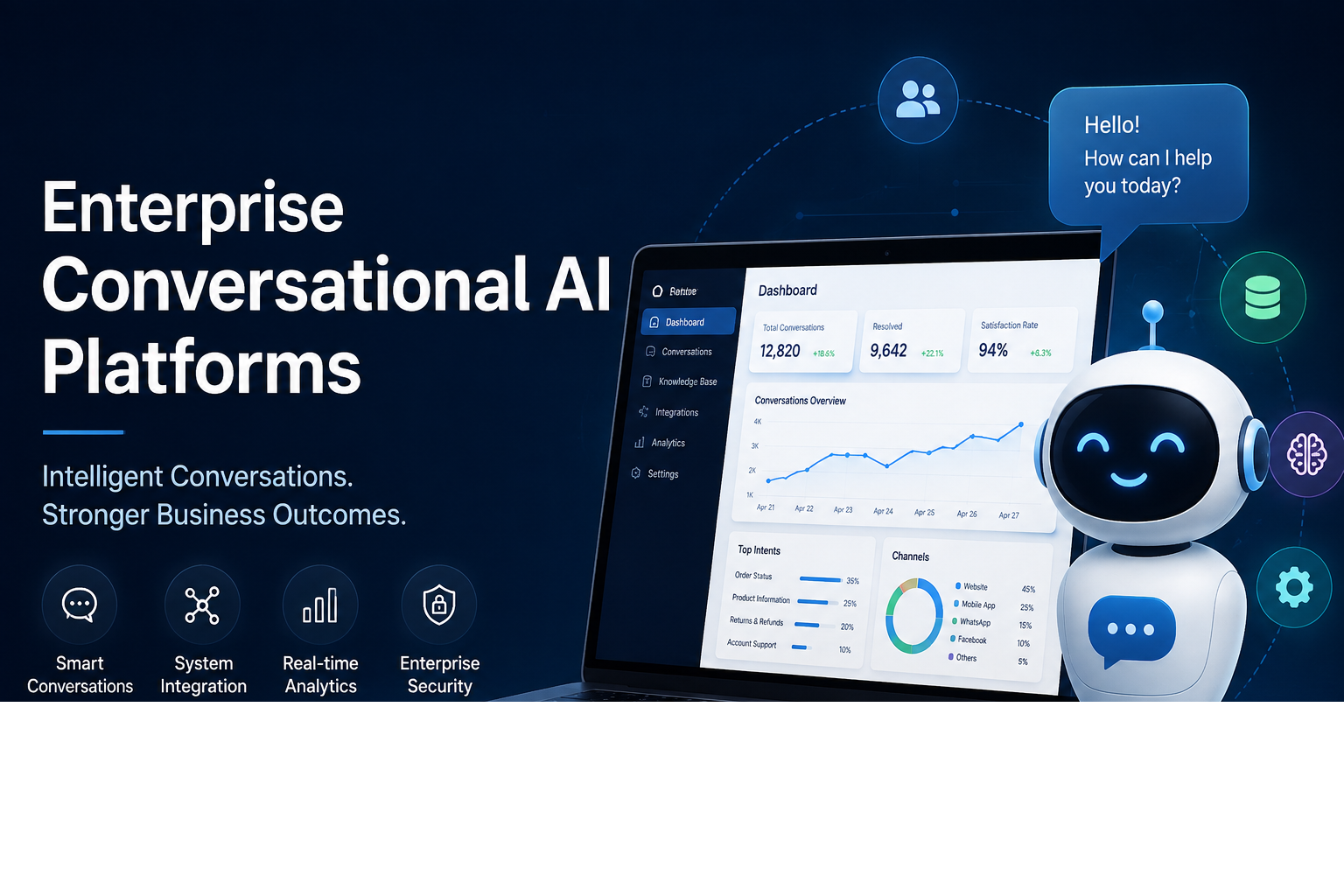
Businesses are increasingly using artificial intelligence to improve how they communicate with customers, employees, and partners. Enterprise Conversational AI Platforms provide organizations with tools to build intelligent virtual assistants, chatbots, and automated communication systems that can understand natural language and respond in a more useful way.
Unlike basic chatbots that rely on predefined answers, modern conversational AI can understand context, process different types of questions, and support more complex interactions. This makes it useful across customer service, sales, human resources, IT support, and other business functions.
What Are Enterprise Conversational AI Platforms?
Enterprise conversational AI platforms are software solutions designed to help large organizations create and manage AI-powered conversations.
These platforms can connect with business systems such as customer relationship management software, knowledge bases, help desks, and internal databases. This allows AI assistants to access relevant information and provide more personalized responses.
For example, a customer might ask about an order, while an employee could use an internal AI assistant to find company policies. The same underlying technology can support different business workflows.
Why Are Businesses Using Conversational AI?
Customer expectations have changed significantly. People increasingly expect quick answers and convenient digital communication. Businesses, meanwhile, need to handle large numbers of questions without continuously increasing support costs.
Conversational AI can help by providing assistance around the clock. It can answer common questions instantly and transfer more complicated issues to human employees when necessary.
This combination of automation and human support can create a more efficient customer experience.
Key Features
Natural Language Understanding
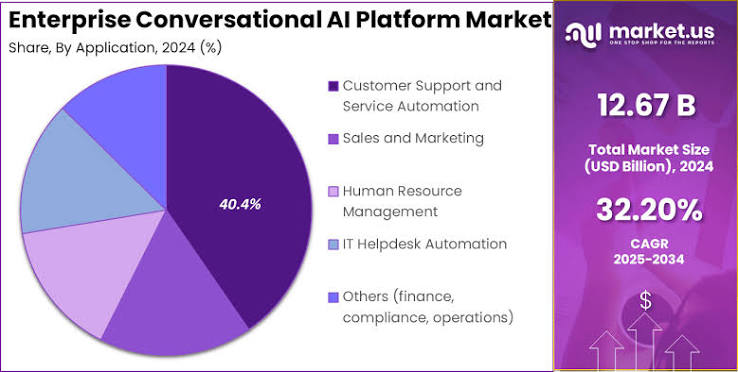
Modern platforms are designed to understand everyday language instead of requiring users to follow specific commands. This allows people to communicate with an AI assistant in a more natural way.
Integration With Business Systems
Enterprise AI becomes more useful when it can connect with existing business applications. Integrations with CRM, help desk, e-commerce, and knowledge management systems can allow assistants to provide information based on real business data.
Omnichannel Communication
Organizations may want to communicate with customers through websites, mobile applications, messaging services, or other digital channels. A strong platform can help manage conversations across multiple touchpoints.
Analytics and Monitoring
Businesses need to understand how AI assistants are performing. Analytics can reveal common questions, unsuccessful interactions, customer satisfaction trends, and areas where the system needs improvement.
Benefits for Enterprises
An AI assistant can handle many routine conversations simultaneously, helping businesses manage periods of high demand.
Conversational AI can also reduce repetitive work for employees. Instead of answering the same basic questions repeatedly, support teams can focus on complex problems that require human expertise.
Another benefit is consistency. AI assistants can follow defined business rules and provide standardized information across different customer interactions.
Common Business Applications
Enterprise conversational AI can be used in many departments.
Customer service: AI assistants can answer frequently asked questions, provide order information, and guide customers through basic support processes.
Sales: Conversational tools can qualify leads, answer product questions, and help potential customers find relevant information.
Human resources: Employees can use AI assistants to find information about benefits, policies, leave procedures, and internal processes.
IT support: AI can help employees troubleshoot common technical problems and locate solutions within an organization’s knowledge base.
Challenges to Consider
Despite its advantages, conversational AI requires careful planning. Organizations need to consider data security, privacy, system integration, response accuracy, and ongoing maintenance.
AI systems can also misunderstand questions or provide incorrect information. For this reason, businesses should establish appropriate monitoring and escalation processes.
Employee training is another important factor. Staff should understand when AI should handle a request and when a conversation should be transferred to a human specialist.
The Future of Enterprise Conversational AI
Conversational AI is moving toward more capable systems that can understand context, work with business data, and complete multi-step tasks.
As AI technology develops, enterprise assistants may become less focused on simply answering questions and more capable of helping users complete actions. This could make conversational interfaces an important part of everyday business operations.
Conclusion
Enterprise Conversational AI Platforms can help organizations improve communication, automate repetitive interactions, and provide faster access to information. From customer service and sales to HR and IT support, these platforms have applications across many areas of a business.
The most effective approach is not to replace human employees entirely. Instead, businesses can use conversational AI to handle routine interactions while allowing people to concentrate on complex tasks that require experience, judgment, and empathy.
FAQ
What are Enterprise Conversational AI Platforms?
Enterprise Conversational AI Platforms are software solutions that help businesses create AI-powered chatbots and virtual assistants for customer service, sales, HR, IT support, and other operations.
How does conversational AI help businesses?
It can automate routine questions, provide faster responses, reduce repetitive work, and help employees focus on more complex tasks.
Can enterprise conversational AI integrate with existing systems?
Yes. Many platforms can integrate with CRM systems, help desks, knowledge bases, and other business applications.
Is conversational AI useful for customer service?
Yes. It can answer common questions, provide basic support, guide customers through processes, and transfer complex issues to human agents.
-

 UK News3 months ago
UK Wildfires 2026: Why Are Fires Spreading and Which Areas Are at Risk?
-

 Crypto3 months ago
Crypto Trading May Be Algorithmic in the Future, but Not Completely Autonomous
-

 Fashion5 months ago
Here are the Top 8 Luxury Clothing Brands in the UK for 2026?
-

 Fashion5 months ago
How to Build a Capsule Wardrobe on a UK Budget?
-

 Technology & AI6 months ago
Depomin82: Rethinking Digital Infrastructure for a Smarter Connected Future
-

 Business5 months ago
The Hidden Expenses in eCommerce Accounting: The Reasons Most UK Online Retailers Calculate Profit incorrectly
-

 Celebrity4 months ago
Liam Costner: Life, Career, and Family Beyond Hollywood
-

 Celebrity5 months ago
Tom Hardy Net Worth in 2026: Salary, Earnings & Career Highlights