
Business
Why are companies using CRM Automation Solutions in 2026?

Certain factors have definitely been exacerbated, such as the necessity for automation and increased complexity in data management due to the exponential expansion of AI. CRM automation technologies are therefore the most successful solution developed.
Given this perspective, it should come as no surprise that AI agents and marketing tools are used so frequently.Automated tools are more than just programs that carry out repetitive operations; they also enhance real-time interactions and remove the drawbacks of manual CRM procedures.
What are CRM automation tools?
Manually managed chores all rapidly become tiresome and intolerable. It’s not that the task is pointless—quite the contrary—but as an employee, you are well aware that you might use your time more wisely.In light of this, using an automated tool—even better if it’s coupled with a CRM—would be the greatest method to eliminate all of these time-consuming chores.
Definition and core functionalities
CRM automation refers to customer relationship management software, which is software capability created especially to boost marketing, customer support, and sales activities by removing human labor and repetitive tasks.
The procedure is as follows: as a business, you will start gathering data about your activities and clients, and the CRM system will automatically process, manage, and strategically use the data to respond to your demands.
Among its functionalities, you will find:
Marketing automation: is the integration of email marketing with consumer dynamics tracking.
Data synchronization and quality: it will integrate and synchronize all the information, as well as perform data cleansing.
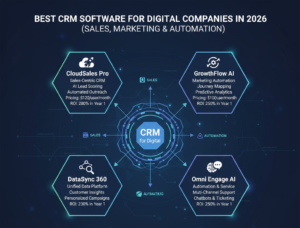
Traditional CRM systems versus CRM automation technologies
Even though they all sound similar and ultimately refer to CRM systems, automated and traditional CRM systems differ greatly from one another.
CRM automation functions independently and is in charge of archiving all data while working purposefully and strategically in light of the organization’s goals, much like an active engine.
CRM automation’s main advantages
In 2026, “45% of CRM users said automation is the most important feature they want in a CRM tool,” according to data analyzed by Email Vendor Selection.
The effectiveness of every activity carried out has significantly increased, thus this is no coincidence.
This kind of success is mostly attributable to the capabilities of this kind of instrument, particularly the advantages it offers when utilized.
Improved efficiency and productivity
Working with automation allows you to assign monotonous work to an intelligent computer, giving your teams more time to concentrate on other, more productive tasks.
Your business and team will become more productive and efficient as a result of assigning tasks to a tool that runs independently and creates smooth operations that boost sales.
Better lead management and nurturing
This tool enhances lead management and development while assisting you in creating effective and efficient activities through data administration and processing.
To put it another way, this customer relationship management software will precisely identify the potential customers you should stay in touch with and will take calculated steps to turn them into devoted patrons.
In addition, it will assume the responsibility of strategically and successfully fostering them.
How CRM automation works

We are aware of the fundamentals: this technology guarantees that no data is lost and removes tedious processes.
Demonstrating how automation tools function is a fantastic approach to illustrate how they enhance sales and customer management. I discuss a tool that has the potential to be very successful, and the way it works is the main reason for that.
Workflow automation and triggers
There are three steps that any sales and customer service action must take: a beginning, a development, and a conclusion.
However, logic is the foundation of any sequence, and customer relationship management software is no exception, as it generates triggers like actions.
Data collection and synchronization
This CRM application gathers and synchronizes data from the different channels it oversees to make sure everything runs smoothly.
To put it another way, you can work across a variety of marketing, sales, and customer support channels, and the CRM will handle collecting all the necessary data and distributing it in accordance with the request.
In this manner, the user will always be handled appropriately, regardless of the channel they utilize. Additionally, since cleaning is a part of data processing, you won’t have any trash stuff.
Software applications for sales automation in many business domains
There are several varieties of sales automation software solutions, each of which is specialized to enhance a certain field, rather than being restricted to a single industry.
Excellent CRM tools are available for every aspect of corporate operations. According to Lindy’s list, these are the top ones.
Marketing automation and segmentation
The CRM serves as a traffic receiver and starting information point in the marketing and automation space; that is, it administers drip campaigns, classifies contacts using dynamic segmentation, and automatically logs every campaign.
All CRM systems can do this, but right now I suggest Salesforce, a sophisticated and adaptable platform that offers you a 360-degree perspective to handle your clients and enhance your marketing procedures.
In conclusion, which CRM workflow automation tools are the best?
According to Emailtooltester, these are the top three that are genuinely controlling the market:
HubSpot: I know I’ve previously mentioned it, but really, it’s the most widely used tool available right now. First, it’s very user-friendly and accessible, and second, it offers excellent results quickly.
ActiveCampaign:Excellent and well-known for enhancing your email marketing procedures is ActiveCampaign. It’s also among the top CRMs for automating your marketing and sales procedures, creating pipelines, and tracking deals.
Engagebay: A CRM that helps companies map their sales cycle, creating dynamic and fluid actions thanks to its personalized data management and attractive interface design.
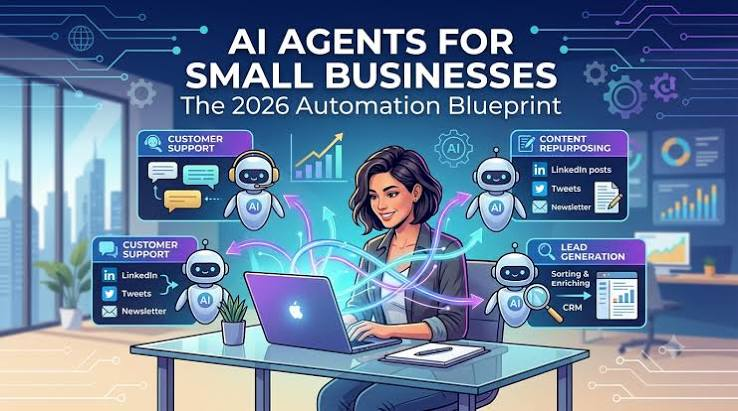
Artificial intelligence is becoming more useful for small businesses in 2026. While many companies started with simple AI chatbots and content-generation tools, the next development is AI agents—systems designed to handle tasks, use digital tools and work towards a specific goal.
For small businesses, this could be particularly important because AI agents may help reduce repetitive work without requiring a large team. The UK Competition and Markets Authority says agentic AI can potentially plan, coordinate and take actions across different services, although many current implementations remain limited and operate with human oversight.
What are AI agents?
An AI agent is a software system that can take a goal and work through several steps to achieve it.
A traditional chatbot might answer a customer’s question and leave the business owner to complete the next step.
The difference is action.
They can potentially interact with websites, databases, business software and other digital tools to complete parts of a workflow. The UK’s AI Security Institute has found a growing ecosystem of agent tools capable of actions such as browsing websites, executing code and interacting with external systems.
Why are AI agents important for small businesses?
Small businesses often have limited time and staff.
An owner might spend hours every week answering similar emails, organising appointments, checking enquiries, updating spreadsheets or following up with customers.
These tasks may not require complex human judgement, but they can still take valuable time.
An AI agent could potentially handle parts of these repetitive workflows while allowing employees to focus on customers, strategy and other work that requires human involvement.
The UK government is actively encouraging businesses to move beyond basic AI use and explore ways technology can transform workflows, products and business models.
How could a small business use an AI agent?
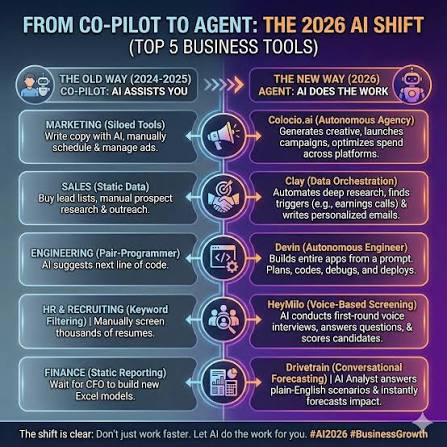
There are several practical possibilities.
Customer service
An AI agent could answer common customer questions, search a company’s approved information and escalate unusual cases to a human employee.
Appointment management
For businesses that rely on appointments, an AI system could potentially help manage enquiries, check availability and organise bookings.
Lead follow-up
An agent could identify new enquiries, collect basic information and send an appropriate follow-up message before passing the lead to a member of staff.
Document processing
Businesses receive invoices, forms, orders and other documents every day. AI agents can potentially extract information and transfer it into other systems, reducing manual data entry.
Internal administration
An agent could help organise information, create reports or coordinate repetitive tasks across different software platforms.
These examples are most suitable when the workflow is clearly defined and the business can monitor what the system is doing.
AI agents are not the same as AI chatbots
The terms are sometimes used interchangeably, but there is an important difference.
A chatbot generally responds to a user’s prompt. An AI agent is designed to pursue a goal through multiple steps.
For example:
Chatbot: “Here is a draft reply to your customer.”
AI agent: “I checked the customer record, reviewed the relevant information, prepared the response and sent it according to the approved workflow.”
The second example involves multiple actions rather than simply generating an answer.
However, not every product marketed as an “AI agent” is fully autonomous. The CMA notes that current consumer-facing implementations are generally bounded, with human escalation still common.
What are the risks for small businesses?
AI agents can create new risks because they may have access to business systems and information.
An incorrect decision that stays inside a chatbot conversation may be relatively easy to correct. An incorrect action taken by an AI agent could potentially affect a customer, order, payment or business record.
That is why businesses need clear permissions, monitoring and human oversight.
The UK’s National Cyber Security Centre recommends understanding dependencies, monitoring agent behaviour, threat-modelling deployments and preparing for failures or misuse. It also recommends starting small and building security and governance into the deployment from the beginning.
Businesses also remain responsible for complying with consumer protection law when using AI agents. The CMA specifically advises companies to tell customers when they use an AI agent, train the system appropriately and monitor its performance.
Should every small business use AI agents in 2026?
No.
The best starting point is not to automate everything. Instead, businesses should identify one repetitive, low-risk task where automation could genuinely save time.
For example, a company could begin with handling frequently asked questions or organising internal documents. Once the workflow works reliably, it may be possible to expand into more complicated processes.
This approach is safer and more practical than giving an AI system unrestricted access to important business operations.
What is the future of AI agents?
AI agents are likely to become more common as businesses become more comfortable connecting AI systems with their existing software.
The UK is already treating agentic AI as an important part of its technology landscape. Government research highlights potential benefits including productivity improvements, while also recognising concerns around transparency, accountability, security and consumer protection.
For small businesses, the biggest opportunity may not be replacing employees. It could be giving a small team the ability to accomplish more with the same amount of time.
Final Thoughts
AI agents for small businesses in 2026 represent an important change in how companies can use artificial intelligence.
Instead of simply asking AI to create an answer, businesses can increasingly explore systems that help complete multi-step tasks. Customer service, administration, lead management and document processing are among the areas where this technology could provide practical benefits.
But successful adoption requires caution. Businesses should start with simple workflows, limit permissions, monitor performance and keep humans involved when decisions have significant consequences.
The future of AI for small businesses may therefore be less about replacing people and more about giving people smarter digital assistance to get everyday work done.

Document Management Organizations generate and manage vast amounts of data on a daily basis in the fast-paced corporate world of today. Documents are at the core of nearly every operation, including contracts, invoices, reports, presentations, customer information, and internal communications.
For this reason, more intelligent document management is now a crucial component of contemporary corporate operations. Teams can organize files, enhance collaboration, safeguard sensitive data, and streamline daily workflows with the aid of a well-designed document management system.
What Is Document Management?
The process of creating, storing, organizing, accessing, sharing, and preserving digital documents in an organized setting is known as document management.
Conventional document storage frequently uses various online services, email attachments, physical filing cabinets, and folders dispersed across individual computers. As a business expands, these techniques may become challenging to administer, even though they could be effective for little amounts of data.
A more intelligent approach to document management organizes crucial files so that staff members may swiftly and safely locate the information they require.
Why Efficient Document Management Matters

Poor document organization can create more problems than simply wasting time. Employees may accidentally work on outdated files, duplicate documents, send confidential information to the wrong person, or lose important records.
A smarter system can help businesses:
- Reduce time spent searching for files
- Improve team collaboration
- Minimize duplicate documents
- Maintain consistent file versions
- Strengthen information security
- Simplify document approval processes
- Improve productivity
- Support compliance and record-keeping
When employees can access accurate information without unnecessary delays, the entire workflow becomes more efficient.
Centralize Your Documents
Establishing a central location for corporate files is one of the easiest methods to enhance document management.
Organizations can create an organized digital repository in place of dispersing papers among personal computers, email inboxes, USB devices, and other storage platforms.
Departments, projects, clients, document kinds, and business functions can all be used to arrange documents.
Make Documents Easy to Find
Only when workers can easily find what they need can a document management system be beneficial.The ability to search can have a significant impact. Users can search by file name, keywords, document type, date, author, project, or other metadata using contemporary systems.
For instance, an employe might search for the customer name or contract number to quickly find the pertinent document rather than manually going thru dozens of folders for a certain contract.This can save a lot of time, especially for businesses that handle thousands of files.
Improve Version Control
Another crucial component of more intelligent document management is version control.Imagine a group of people working on a significant idea. While earlier versions are still accessible when needed, employees can recognize the most recent version.This lowers the possibility of inadvertently changing or disseminating an out-of-date document.
Simplify Collaboration
Employees of modern companies frequently work from multiple locations, cities, or nations. By enabling authorized users to access shared files from the proper devices and locations, document management systems can facilitate collaboration.
Without continuously exchanging attachments via email, teams may work together on documents.
Employees can work in a regulated environment where updates and modifications are easy to handle rather than exchanging different versions.
Project teams, remote workers, outside partners, and departments that regularly exchange information may find this very helpful.
Automate Repetitive Workflows

Smarter document management goes beyond storage. Automation can help reduce repetitive administrative tasks.
For example, businesses can create workflows for:
- Document approvals
- Contract reviews
- Invoice processing
- Employee onboarding
- Purchase requests
- Compliance checks
- Records retention
Instead of manually sending every document to the next person, automated workflows can notify the appropriate employee when an action is required.
This helps reduce delays and allows employees to spend more time on higher-value activities.
Protect Sensitive Information
Confidential information is frequently found in business papers, such as financial records, contracts, employee data, customer information, and intellectual property.
Thus, a key component of document management should be security.
Features including role-based access restrictions, encryption, audit trails, safe backups, authentication, and suitable retention rules should be taken into account by organizations.
Only the documents required for their duties should be accessible to employes. Reducing needless access lessens the possible consequences of unintentional or unapproved disclosure.
Reduce Dependence on Paper
Businesses can also become more efficient by switching from paper documents to digital operations.
Physical storage, manual filing, printing, copying, and upkeep are all necessary for paper documents. They may also be lost or destroyed.
Digital document management can lower the amount of paper used while facilitating the search, sharing, and backup of information.
Digitizing document workflows can be a useful step toward more sustainable operations for companies looking to cut operational waste.
Choose the Right Document Management Solution
Every organization has different requirements, so there is no single document management solution that works for everyone.
Before choosing a system, consider:
- Number of users
- Amount of storage required
- Security requirements
- Collaboration needs
- Integration with existing software
- Automation capabilities
- Search functionality
- Mobile accessibility
- Backup and recovery options
- Scalability
- Cost
The best solution should support your existing workflow rather than making everyday tasks unnecessarily complicated.
Train Your Team
Technology alone cannot solve document management problems. Employees need to understand how the system should be used.
Create clear guidelines for naming files, organizing folders, assigning permissions, updating documents, and handling confidential information.
Training should be practical and easy to understand. Employees are more likely to follow a new process when they understand how it saves them time and makes their work easier.
Keep Improving Your Workflow
Document management should not be considered a one-time project. As your business grows, your information needs will change.
Regularly review your folder structures, permissions, workflows, retention policies, and storage requirements. Identify bottlenecks and ask employees where they are still losing time.
Small improvements can have a significant impact when repeated across an entire organization.
Final Thoughts
Smarter document management can transform the way businesses handle information. By centralizing files, improving search, controlling document versions, simplifying collaboration, automating repetitive processes, and strengthening security, organizations can create faster and more reliable workflows.
The goal is not simply to store documents digitally. It is to make information easier to access, manage, protect, and use.
As businesses continue to rely on digital information, an effective document management strategy can become an important foundation for productivity and long-term growth. When the right technology is combined with clear processes and employee training, teams can spend less time managing files and more time getting meaningful work done.

Starting an escape room business can be an exciting opportunity for entrepreneurs who enjoy creativity, puzzles, storytelling, and entertainment. Escape rooms have become a popular group activity for friends, families, tourists, corporate teams, and people looking for something different from traditional entertainment.
However, opening an escape room requires more than simply designing a few puzzles and renting a space.
You need a strong concept, a suitable location, carefully designed rooms, appropriate safety measures, effective marketing, and a realistic financial plan.
If you are wondering how to start an escape room business, this guide explains the major steps from planning your idea to attracting your first customers.
1. Research the Escape Room Market
Before investing money, research your local market. Look for existing escape rooms in your city and nearby areas and study their themes, prices, reviews, room sizes, difficulty levels, and customer experiences.
Pay attention to what competitors are doing well and where customers appear to be dissatisfied. Reading online reviews can help you identify opportunities to offer something better.
You should also determine who your target customers will be. Possible audiences include:
- Families
- Teenagers and young adults
- Couples
- Tourists
- Birthday groups
- Corporate teams
- School and university groups
- Friends looking for weekend entertainment
Understanding your audience will help you choose the right themes, pricing, location, and marketing strategy.
2. Create a Unique Escape Room Concept
A memorable concept can make your business stand out. Instead of creating a generic room, develop a story that gives customers a reason to become emotionally involved in the experience.
Popular themes can include:
- Haunted houses
- Detective mysteries
- Bank heists
- Secret laboratories
- Ancient civilizations
- Prison escapes
- Spy missions
- Fantasy adventures
- Science-fiction worlds
Your theme should influence the room’s decoration, puzzles, sounds, lighting, characters, and storyline.
A strong escape room should feel like an experience rather than a collection of unrelated puzzles.
3. Write a Business Plan
A business plan helps you understand whether your idea is financially realistic.
Your plan should cover your estimated startup costs, monthly expenses, expected revenue, pricing, target audience, competition, marketing strategy, and break-even point.
Typical expenses may include:
- Commercial rent and security deposits
- Construction and renovation
- Furniture and decorations
- Puzzle equipment
- Electronic locks and sensors
- Cameras and monitoring equipment
- Insurance
- Licenses and permits
- Website development
- Advertising
- Staff salaries
- Utilities
- Cleaning and maintenance
Your financial plan should include enough money for unexpected expenses because construction and room development can easily cost more than originally expected.
4. Choose the Right Location

Location can have a major impact on an escape room’s success.
Ideally, choose a location that is easy to find and accessible to your target customers. Areas near entertainment districts, shopping centers, restaurants, tourist attractions, universities, or busy commercial neighborhoods may provide useful foot traffic.
You should also consider parking, public transportation, visibility, building accessibility, and whether the property allows the type of business you plan to operate.
Before signing a lease, verify zoning requirements and local regulations. You should also check whether the property can legally accommodate the number of customers you expect.
5. Design the Escape Rooms
Room design is the heart of the business.
A good escape room should have a logical progression. Players should understand what they are trying to accomplish while still having enough uncertainty to make the experience exciting.
Puzzles can involve:
- Locks and keys
- Hidden compartments
- Numbers and codes
- Logic problems
- Observation challenges
- Physical objects
- Audio clues
- Lights and electronics
- Team-based challenges
Avoid making every puzzle dependent on one difficult clue. If players become stuck for too long, frustration can replace enjoyment.
A combination of easy, medium, and challenging puzzles usually creates a better experience.
6. Make Safety a Priority

Safety should never be treated as part of the entertainment.
Customers need to know how to exit the room in an emergency. You should follow applicable fire, building, occupancy, accessibility, electrical, and other local safety requirements.
Depending on your setup, you may also need emergency lighting, fire protection equipment, surveillance systems, staff monitoring, and clearly defined emergency procedures.
Before opening, have qualified professionals inspect the premises and verify that your setup complies with applicable local requirements.
7. Test Everything Before Opening
One of the most important steps is testing.
Invite friends, employees, or independent testers to play the room without explaining the puzzles to them. Watch where they become confused, where they move too quickly, and which clues they completely miss.
Ask testers:
- Was the story easy to understand?
- Were the puzzles enjoyable?
- Did anything feel unfair?
- Were there too many or too few clues?
- Was the room difficult enough?
- Were the instructions clear?
- What was the most memorable part?
Use their feedback to improve the experience before charging customers.
8. Set Your Pricing
Your pricing should reflect your operating costs, room quality, local competition, and customer demand.
Many escape room businesses charge per person, although some offer private-group pricing. You can also introduce different prices for weekdays, weekends, holidays, and special events.
Consider offering packages for:
- Birthday parties
- Corporate events
- School groups
- Large private groups
- Repeat customers
Discounts can attract customers during slower periods without forcing you to reduce your standard price throughout the week.
9. Build a Strong Online Presence
A professional website is essential because many customers will discover and book your business online.
Your website should clearly show:
- Room themes
- Difficulty levels
- Game duration
- Prices
- Age recommendations
- Location
- Available booking times
- Frequently asked questions
- Contact information
Online booking is especially important because customers often search for activities outside normal business hours.
Social media can also help you promote the experience. Short videos, behind-the-scenes content, room reveals, customer reactions, and seasonal promotions can generate interest.
10. Market Your Escape Room
Marketing should begin before your official opening.
Create a launch campaign that builds curiosity around your rooms. You could offer limited preview sessions, opening discounts, contests, or special bookings for local businesses and influencers.
Local search visibility is particularly valuable. Encourage satisfied customers to leave genuine reviews on platforms where people search for entertainment businesses.
Partnerships can also bring customers. Consider working with hotels, restaurants, tourism companies, event planners, universities, and local businesses.
Corporate team-building can become a particularly useful revenue stream because companies may book larger groups at once.
11. Hire and Train Your Staff
Your employees can significantly affect the customer experience.
Staff members should understand the puzzles, know how to provide hints without ruining the game, monitor rooms appropriately, explain safety procedures, and handle customer questions professionally.
Training should also cover emergency procedures, equipment problems, cleaning, resetting rooms, and customer-service situations.
A friendly game master can turn an ordinary visit into a memorable experience.
12. Track Your Business Performance
Once your escape room opens, monitor the numbers carefully.
Important metrics include:
- Bookings per room
- Average revenue per customer
- Room occupancy
- Customer reviews
- Repeat bookings
- Marketing costs
- Cancellation rates
- Staff costs
- Monthly operating expenses
If one room consistently performs poorly, investigate why. The problem could be the theme, difficulty, marketing, price, or customer experience.
Final Thoughts
Learning how to start an escape room business requires a combination of creativity and careful business planning. A great theme may attract customers initially, but excellent puzzles, safety, customer service, and memorable experiences are what encourage positive reviews and repeat business.
Start by researching your market, developing a unique concept, preparing a realistic business plan, choosing a suitable location, and designing rooms that are challenging without becoming frustrating. Test everything before opening and continue improving your rooms based on genuine customer feedback.
With thoughtful planning and strong execution, an escape room can become more than a local entertainment venue—it can develop into a recognizable experience business with opportunities for private events, corporate bookings, parties, and repeat customers.
-

 Crypto2 weeks ago
Crypto Trading May Be Algorithmic in the Future, but Not Completely Autonomous
-

 Technology & AI3 months ago
Depomin82: Rethinking Digital Infrastructure for a Smarter Connected Future
-

 Fashion2 months ago
How to Build a Capsule Wardrobe on a UK Budget
-

 Business3 months ago
The Hidden Expenses in eCommerce Accounting: The Reasons Most UK Online Retailers Calculate Profit incorrectly
-

 Fashion2 months ago
Here are the Top 8 Luxury Clothing Brands in the UK for 2026
-

 Celebrity2 months ago
What is Tom Hardy’s Net Worth and Salary?
-

 Celebrity3 months ago
Fred Dimbleby: ITV News’s Top Political Journalist and His Influence on UK Reportin
-

 Blog3 months ago
mmsbre: Reimagining Digital Connectivity in a Hyper-Intelligent World